GUIDs, Damn GUIDs and Microsoft Entra
I've done some embarrassing things for money in my life. One such thing is attempt to understand Entra and the different GUIDs in front of my peers. If like me, you can't keep track of all the different names and GUIDs or identifiers, then I hope this post will help. It's my attempt at a cheat sheet of the concepts and use case for Entra that I've encountered. I make no promises that this will make more sense by the end, but I hope you feel less alone in your confusion.
Two types of identities
There are two types of managed identities, System Assigned and User Assigned.
- System-assigned = born with the resource, dies with the resource.
- User-assigned = separate life, reusable across many resources.
You only really need to think about this at creation time, and the question of which to use really comes down to if you need the identity to be used by multiple resources or be stable beyond the lifecycle of the resource. In the case of an identity that represents your Kubernetes service, you want user assigned so all pods use the same Identity and the IDs below don't change when you rotate clusters or kick pods. For your azure resources like CosmosDB or Azure Managed Redis, system assigned is probably fine.
Identifying Identity IDs
Diving right in, here's a simple reference to the different GUIDs relevant in service authentication scenarios
| GUID Type | Simple Explanation | Example Usage |
|---|---|---|
| Tenant ID | Identifies your Microsoft Entra directory (organization). | Your company's unique cloud identity space. |
| Client ID (Application ID) | Identifies an application or managed identity registered in Microsoft Entra. | AKS service app registration for authentication. |
| Object ID (Service Principal) | Identifies a specific principal (instance) of an app within your tenant. | Specific instance granting permissions to resources. |
| Application Object ID | Internal ID for the app registration object itself. | Used administratively, less common in daily integration. |
| Access Token (Runtime) | Temporary credential proving the app or managed identity's authorization. | Used by AKS services to call Azure resources like Key Vault or Cosmos DB at runtime. |
Passport/SSN Analogy
To try put this into a less technical context, here's how you this model applies to government identification.
| Entra GUID Type | Real-world Analogy | Explanation |
|---|---|---|
| Tenant ID | Country (e.g., USA, Canada) | Your organization's country — it defines the whole boundary and citizenship for your apps and users. |
| Client ID (Application ID) | Passport Number | The passport number for your app — used when traveling (authenticating) to prove identity. |
| Object ID (Service Principal) | Social Security Number (tax id) | A permanent, internal ID for a specific person (or app instance) in that country (tenant). Used internally for permissions and records. |
| Application Object ID | Passport Record ID (government file ID) | Administrative ID for the passport itself, not usually needed unless you're a government worker (admin-level tasks). |
| Access Token (Runtime) | Visa Stamp in Passport | Temporary proof that allows access to resources/services during travel (runtime calls). |
There are a couple of minor caveats where this analogy doesn't align:
- In the real world each country issues their own passports, but Entra controls token issuing, not your tenant. To be fair, you do get a token scoped to a tenant, my point is that in the analogy countries trust each other to issue passports, but in Entra land Entra is the only one issuing identities and tokens.
- A ClientId is globally unique across all tenants, but passport numbers are not unique to the issuing country.
- A person typically only has one passport and one SSN, with Entra one resource can have multiple identities. There is only one system assigned identity per resource but you can set up multiple user assigned identities.
These distinctions are quite useful when you get into scenarios where you want to perform cross tenant authentication.
Entra token break down
Heres a summary of the contents of a Entra token.
| Claim (Field) | Meaning | Example |
|---|---|---|
aud |
Audience – who this token is meant for. | https://vault.azure.net (Key Vault) |
iss |
Issuer – who issued the token. | https://sts.windows.net/{tenantId}/ |
sub |
Subject – unique identifier of the user or app. | Object ID of the calling service. |
appid |
Application ID (Client ID) of the app/service. | Matches the caller's Client ID. |
oid |
Object ID of the identity (service principal or managed identity). | Used for RBAC. |
tid |
Tenant ID of the directory. | Your company's Microsoft Entra ID. |
scp |
Scopes (optional) – permissions granted if the token is scoped. | user_impersonation, etc. |
roles |
App roles assigned to the principal. | e.g., KeyVaultReader, StorageBlobDataReader |
exp |
Expiration time (epoch timestamp). | Usually valid for 1 hour (3600s). |
iat |
Issued-at time. | Epoch timestamp when token was issued. |
Note: if you're cracking open an Entra token, something upstream failed spectacularly. You're fighting battles the docs swore you'd never have to, and crossed into the realm of problems people pretend don't exist. You're now officially the grown-up in the room.
Getting a token
new DefaultAzureCredential(); works some pretty neat magic. Based upon the environment that you are running in and what credentials or identities are on or assigned to the machine, it will pick the best identity to use. When you are accessing your azure resource in the same tenant, no additional configuration is required if the Managed Identity is already on the box. Neat!
When using this in service to service auth, you'll need to specify a few more properties.
private string TenantId = "00000000-0000-0000-0000-000000000001";
private string CallerClientId = "00000000-0000-0000-0000-000000000002";
private string CalleeClientId = "00000000-0000-0000-0000-000000000003";

private string AadTokenScope = {{CONTENT}}quot;{CalleeClientId}/.default";

private string AadAuthority = {{CONTENT}}quot;https://login.microsoftonline.com/{TenantId}/";

public static async Task<string> GetAadAccessToken(CancellationToken cancellationToken)
{
    var options = new DefaultAzureCredentialOptions()
    {
        AuthorityHost = new Uri(AadAuthority),
        ManagedIdentityClientId = CallerClientId,
    };

    TokenCredential credential = new DefaultAzureCredential(options);

    AccessToken accessToken = await credential.GetTokenAsync(
        new TokenRequestContext(scopes: new string[] { AadTokenScope }),
        cancellationToken);

    return accessToken.Token;
}
A couple of things to highlight:
- On line 13, we are specifying the authority as the TenantId from the caller. In most scenarios your TenantId is the same for both caller and callee, but in cross tenant scenarios this should be caller TenantId.
- On line 20, we are specifying the scope as the the ClientId of the ManagedIdentity assigned to service we are calling.
The actual flow of authentication
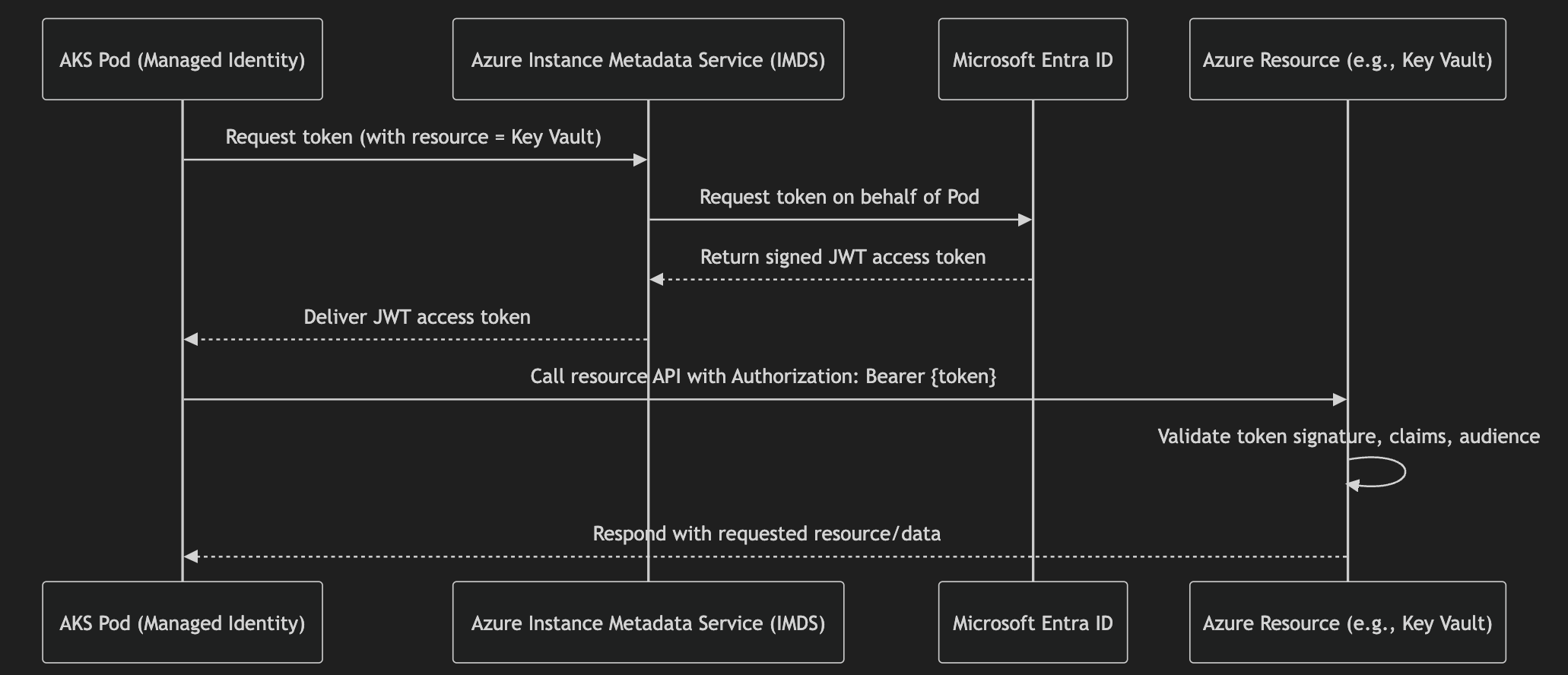
So when do I use what?
Let's put this into practice, when should I use what ID?
The caveat here is in s2s auth, where the callee is validating the token of the caller at.
Assigning a User Assigned Identity to an AKS deployment
Use Infra as code when creating your cluster.
resource managedIdentity 'Microsoft.ManagedIdentity/userAssignedIdentities@2023-01-31' = {
  name: 'example-identity'
  location: resourceGroup().location
}

resource aksCluster 'Microsoft.ContainerService/managedClusters@2023-01-01' = {
  name: 'example-aks'
  location: resourceGroup().location
  identity: {
    type: 'UserAssigned'
    userAssignedIdentities: {
      '${managedIdentity.id}': {}
    }
  }
  properties: {
    ...
  }
}
Service to Service (S2S) authentication
Show appconfig ACL settings for host
{
  "AzureAd": {
    "Instance": "https://login.microsoftonline.com/",
    "TenantId": "YOUR_TENANT_ID",
    "ClientId": "api-client-id",
    "Audience": "api://api-client-id" // Optional: you can rely on ClientId too
  },
  "AllowedClientIds": [
    "client-id-1",
    "client-id-2"
  ]
}
Heres a sample on how in dotnet you would validate bearer tokens against Entra
using Microsoft.AspNetCore.Authentication.JwtBearer;
using Microsoft.Identity.Web;

var builder = WebApplication.CreateBuilder(args);

// Register Microsoft Identity platform auth
builder.Services.AddAuthentication(JwtBearerDefaults.AuthenticationScheme)
    .AddMicrosoftIdentityWebApi(builder.Configuration.GetSection("AzureAd"));

builder.Services.AddAuthorization();

var allowedClientIds = builder.Configuration.GetSection("AllowedClientIds").Get<List<string>>() ?? new();

// Add custom validation to ensure azp/client matches allowed list
builder.Services.Configure<JwtBearerOptions>(JwtBearerDefaults.AuthenticationScheme, options =>
{
    options.Events ??= new JwtBearerEvents();
    var originalHandler = options.Events.OnTokenValidated;

    options.Events.OnTokenValidated = async context =>
    {
        if (originalHandler != null)
            await originalHandler(context);

        var azp = context.Principal?.FindFirst("azp")?.Value;
        if (azp == null || !allowedClientIds.Contains(azp))
        {
            context.Fail("Client not allowed.");
        }
    };
});

var app = builder.Build();

app.UseAuthentication();
app.UseAuthorization();

app.MapGet("/secure", (ClaimsPrincipal user) =>
{
    return Results.Ok({{CONTENT}}quot;Welcome {user.Identity?.Name ?? "unknown"}!");
}).RequireAuthorization();

app.Run();
Authentication to cloud resources
bicep examples of configuring a User Assigned Managed Identity.
Here's an example of using bicep (the same can be one with other Infra as Code solutions like Terraform) to give the CosmosDb contributor role to a managed identity. principalId is the objectId here. Why? Think of this as us telling azure which Entra entity to give access to, rather than giving access to someone who has a token for a managed identity. Both are reasonable interpretations of whats going on in the authentication story, but the validation happening inside of azure is a good clue that you want to use objectId.
Why is it called principalId rather than objectId? ... This one isn't rhetorical, I can't find a good reason.
module managedIdentity 'resourcemodules/managedIdentity.bicep' = {
  name: 'pflb-service-id'
  params: {
    location: location
  }
}

var managedIdentityPrincipal = {
  principalId: managedIdentity.outputs.principalId
  principalType: 'ServicePrincipal'
}

// This is the 'CosmosDB Built-In Data Contributor' - https://learn.microsoft.com/en-us/azure/cosmos-db/how-to-setup-rbac#built-in-role-definitions
resource sqlRoleDefinition 'Microsoft.DocumentDB/databaseAccounts/sqlRoleDefinitions@2021-11-15-preview' existing = {
  name: '00000000-0000-0000-0000-000000000002'
  parent: account
}

resource access_cosmosdb_accounts 'Microsoft.DocumentDB/databaseAccounts/sqlRoleAssignments@2021-10-15' = [for principal in principals: {
  name: guid(account.id, principal.principalId, sqlRoleDefinition.id)
  parent: account
  properties: {
    roleDefinitionId: sqlRoleDefinition.id
    principalId: principal.principalId
    scope: account.id
  }
}]
In summary, use Client ID when requesting a token. Use Object ID when assigning permissions (like in Azure RBAC).
Is this really the best authentication option?
After reading this, you might be thinking I don't like ManagedIdentities. While I think theres a lot of room for improvement when it comes to being user friendly to your average backend service engineer, this is still worlds of improvement over some of the older security practices.
- If you don't have it working correctly, it doesn't work at all. This might sound like a negative, but when it comes to security you want to reduce the possibility that you have over given permissions. In my opinion ManagedIdentity does a good job of encouraging least privilege by default.
- No dealing with expirations, certificate rotations at 3am are not fun.
- You can't accidentally leak a connection string. Again discovering that a credential has been stored in plain text somewhere it shouldn't have been, then jumping through all the hoops to deploy a new rotated secret is time consuming and not fun.
- Revoking access is easy. Either through your Infra as Code, or via the azure portal, you can quickly and easily pull access for specific managed identities.
If you're still reading at this point, I hope I've empowered you to ~rethink your career choices~ get your head around Entra and it's many GUIDs. I've joked in the past about schrodinger's identity, and until you attempt to run your code you need to use both clientId and objectId. I'm also convinced that copy paste button next to these ids in the azure portal is haunted and will copy the other id. I think I'm joking...
Feedback
This is my second blog post and my first attempt at covering an complex technical topic in depth. If you have any feedback, thoughts or questions on this topic please reach out on GitHub or LinkedIn, linked below!